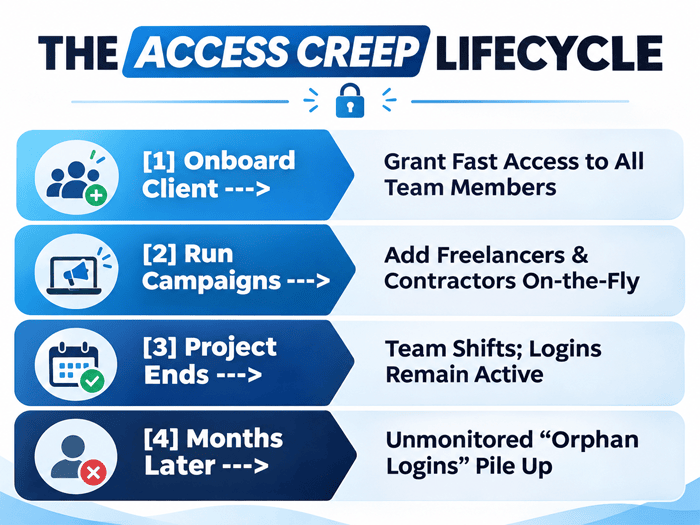
Picture a typical Tuesday morning at a growing digital agency. A new client signs an ad management contract, eager to launch campaigns by Friday. Your account manager rushes to get everything set up. They request admin permissions for Google Ads, Meta Business Manager, TikTok Ads, Google Analytics 4, and Shopify. To hit the tight deadline, access gets handed out quickly to the full-time media buyer, the junior designer, a freelance copywriter in another city, and an external conversion optimization specialist.
Fast forward eighteen months. The client campaign was a success, the freelance copywriter moved on to other projects, and the junior designer took a job elsewhere. But if you were to check those client portals right now, who still holds active login rights?
More often than not, everyone does.
Agencies don’t fail at security because they lack formal policies or good intentions. They fail because convenience beats compliance every single time until an account gets locked, a campaign gets paused, or an audit exposes a massive trail of orphan logins. Managing client access across remote and hybrid teams isn’t about setting up rigid, scary corporate lockdowns. It is about building clean, seamless workflows that keep client assets safe without slowing your team down.
Table of Contents
The Quiet Creep of Unmonitored Client Access
Think of access creep like accumulating clutter in an office storage room. Nobody intends to build a mess. You put a box down because you are in a rush today, another box tomorrow, and within a year, you can barely open the door.
How Fast Onboarding Creates Long-Term Access Debt
When onboarding a fresh account, agency momentum relies on speed. Your client wants to see progress, and your team wants to start executing. Requesting permissions, verifying credentials, and assigning individual user seats can feel like administrative friction. So, teams take shortcuts. Someone creates a shared login, hands out direct master access, or invites contractors directly using personal email addresses. You hit your launch date, but you unknowingly incur “access debt”, a pile of unmanaged permissions that sit dormant across dozens of third-party dashboards.
The Velocity vs. Governance Dilemma
Agencies constantly walk a tightrope between operational speed and governance. If your access protocols require three manager sign-offs just to grant a designer view-only rights to an ad dashboard, your agency slows to a crawl. On the flip side, if anyone can hand out admin rights without logging who received them, you build an invisible web of liability.
The Operational Reality of Managing Multiple Client Portals
A boutique agency managing twenty active clients easily handles over two hundred distinct access points across ad managers, tag managers, domain registrars, email marketing platforms, and CRMs. Multiply those connection points by a flexible workforce of remote employees, fractional executives, and specialized freelancers. Without a centralized view, tracking who holds access to what becomes virtually impossible.
Navigating Dashboard Access Across Remote and Freelance Teams
The shift toward remote work has given agencies unprecedented access to global talent. However, it has also complicated how teams connect to sensitive client environments on a daily basis.
The Challenge of Connecting to Client Assets Off-Site
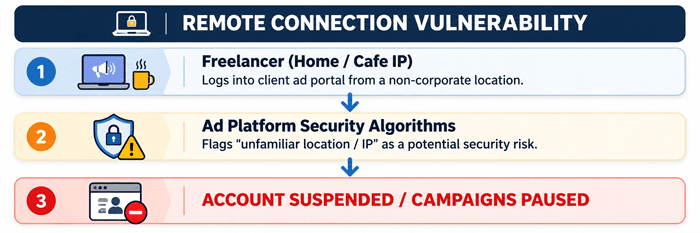
Your media buyers aren’t sitting under one roof using a single office network anymore. They log in from home connections, co-working spaces, coffee shops, or while traveling between client meetings. Every time a team member accesses a client ad account from a new location or a rotating home IP address, the client’s platform takes notice.
The Hidden Costs of Triggering Ad Account Security Flags
Major ad platforms like Meta, Google, and TikTok use automated security bots to protect users from credential theft. When an ad manager sees logins occurring across multiple changing locations or untrusted consumer connections within a short window, its defensive algorithms trigger.
Why Unstable IP Addresses Disrupt Live Campaigns
The result of an IP security trigger isn’t just a minor password reset email. It is often a total account suspension or payment review flag.
- Campaign Downtime: Active ad campaigns freeze instantly, cutting off lead flow during peak promotional windows.
- Wasted Budget: Client ad spend stalls while your team spends hours submitting identity verification documents to platform support teams.
- Client Trust Erosion: Nothing damages client confidence faster than having to explain that their ad account was flagged because a freelance contractor logged in from an unrecognized network.
Establishing Secure, Unified Connections with a Business VPN
How do you give distributed team members seamless access without constantly triggering platform security alarms? You unify their connection environment.
This is where integrating a dedicated business vpn serves as an essential operational asset rather than just a security checkbox. Instead of having ten remote team members hit client ad managers from ten different, constantly fluctuating residential IP addresses, a business VPN provides your team with a stable, encrypted, and dedicated gateway.
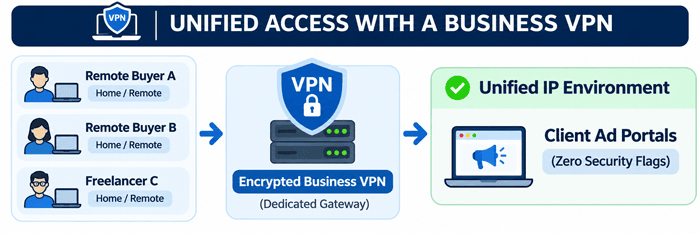
When your contractors and media buyers connect through a secure, company-controlled virtual network, client dashboards recognize a consistent, trusted connection point. This shields open data transmissions across public Wi-Fi networks and eliminates the location anomalies that cause ad platforms to lock down accounts in the middle of a scaling campaign.
Closing the Offboarding Gap: From Chaos to Governance
If onboarding access is messy, offboarding is where the real operational breakdowns happen.
| Scenario | Unmanaged Offboarding Chaos | Centralized Access Governance |
|---|---|---|
| Contractor Departure | Logins remain active in portals | Instant 1-click access revocation |
| Connection Security | Fluctuating, open home networks | Encrypted gateway via Business VPN |
| Permission Assignment | Full admin rights given by default | Role-Based Access Control (RBAC) |
| Verification Method | Text-based SMS / Shared Passwords | Single Sign-On (SSO) & MFA Apps |
| Audit Capability | No record of active user access | Quarterly automated permission log |
Why Offboarding Contractors Is Harder Than Onboarding Them
Bringing a contractor on board comes with clear intent: you need work completed. Offboarding them happens after the project deadline has passed and everyone has moved on to the next fire. Because there is no immediate operational trigger compelling account managers to remove logins, offboarding gets delayed indefinitely.
Months later, a former contractor’s personal email account still holds full administrative access to a client’s primary analytics property or ad account. If that contractor’s personal email ever gets compromised, every client asset linked to it becomes exposed.
Moving Away from Password Sharing to Centralized Control
Sharing raw passwords over messaging apps or storing spreadsheet password logs is an invitation for operational chaos. Modern agency governance relies on single sign-on (SSO) architectures and password management layers. Your team members shouldn’t actually know the raw master passwords to client portals; they should log in through an authenticated management layer that can be revoked in a single click when a project concludes.
Implementing Role-Based Access Control (RBAC)
Stop handing out admin status by default. Enforce Role-Based Access Control (RBAC) across every platform you touch:
- View/Analyst Level: Assigned to copywriters, researchers, and reporting assistants who only need data visibility.
- Standard/Editor Level: Assigned to active media buyers and content creators responsible for drafting and publishing assets.
- Admin/Owner Level: Restricted strictly to agency owners and primary operations directors.
The 4-Step Access Audit Every Agency Should Run This Week
You don’t need to overhaul your entire business operations overnight to fix access creep. You can restore order by running a simple, structured audit framework starting this week.
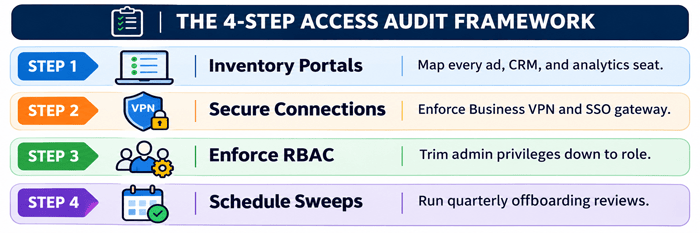
Step 1: Inventory Every Active Client Portal and Property
Create a central register listing every active client and every third-party platform connected to their account. Map out who currently holds active seat permissions across Google Ads, Meta, TikTok, Shopify, HubSpot, and analytics tools.
Step 2: Standardize Secure Remote Access Infrastructure
Require all team members, remote workers, and external contractors to access client dashboards exclusively through secure, encrypted connections. Deploying a dedicated business VPN ensures that all off-site team members connect through a stable, recognized network footprint, protecting sensitive client data while preventing unexpected platform account locks.
Step 3: Tier Permissions with Strict Role-Based Access
Review your newly created inventory and immediately downgrade unnecessary admin accounts. If a freelancer only needs to upload video creative to an ad library, reduce their role to creative contributor or editor. Limit administrative privileges to a tight circle of core leadership.
Step 4: Institute Quarterly Offboarding Sweeps
Block out two hours on your agency calendar at the end of every quarter to run a mandatory access sweep. Compare your active team roster and current contractor agreements against your portal access inventory. Instantly revoke permissions for any individual who hasn’t worked on an active client account within the last thirty days.
Conclusion: Turning Access Management into a Client Trust Asset
In the modern digital agency landscape, client retention isn’t driven solely by creative campaign ideas or lower cost-per-acquisition metrics. It is built on trust, professionalism, and operational maturity.
When a prospective client asks how your agency handles asset security, being able to outline a clean access governance structure (complete with encrypted remote access via a business VPN, role-based permission tiers, and routine audit schedules) instantly sets you apart from amateur competitors.
Stop waiting for a locked ad account or an unmonitored login issue to force your hand. Treat your access infrastructure with the same strategic focus you bring to your marketing campaigns, and turn internal governance into one of your strongest client-facing advantages.
Frequently Asked Questions (FAQs)
What is “access creep” in digital marketing agencies?
Access creep occurs when team members, freelancers, and contractors accumulate permissions across client ad accounts, CRMs, and analytics portals over time without those permissions being revoked when projects end. This creates a buildup of unmonitored, active logins that expose clients to operational risks and platform security flags.
Why do ad platforms flag client accounts when remote freelancers log in?
Ad platforms use automated algorithms to detect unusual login behavior. When a freelancer logs into a client’s ad manager from an unrecognized, constantly changing, or unencrypted IP address, security systems may interpret it as a compromised account, triggering automatic suspensions or identity verification locks.
How does a business VPN help agencies manage remote team access?
It provides remote employees and contractors with a secure, encrypted connection and a consistent, dedicated IP address environment. This protects client credentials across public networks and prevents ad platforms from flagging legitimate team logins as suspicious activity.
How frequently should a digital agency conduct an access audit?
Agencies should conduct a comprehensive access audit at least once every quarter. Additionally, an immediate micro-audit should occur whenever a client contract ends or a contractor finishes their active project scope.
What is the fastest way to offboard a former contractor across multiple client accounts?
The fastest and safest approach is to manage team access through centralized Single Sign-On (SSO) systems and password management layers rather than sharing direct login credentials. When a contractor departs, disabling their centralized identity profile automatically revokes their ability to log into all linked client portals in one step.